SMS Terms

GEENA AI text messages

How people opt in to GEENA AI text messages

GEENA AI LLC's own number is only for people who use GEENA and said yes themselves: cleaning business owners and their team members.

There are three ways to say yes, all inside the GEENA app, behind sign-in. This page shows each screen, the exact words people see and what happens next.

On every path

  • Only the person whose mobile number it is can say yes. Nobody can opt in someone else.
  • Saying yes is optional: the box starts unchecked. Consent is not a condition of purchase.
  • Message frequency varies. Msg & data rates may apply.
  • Reply STOP to opt out at any time. Reply HELP for help.
  • No mobile information will be shared with third parties/affiliates for marketing/promotional purposes.
SMS Terms · Privacy Policy

Path 1

Business owners

Who
The owner of a cleaning business that uses GEENA, for their own mobile number.
Where
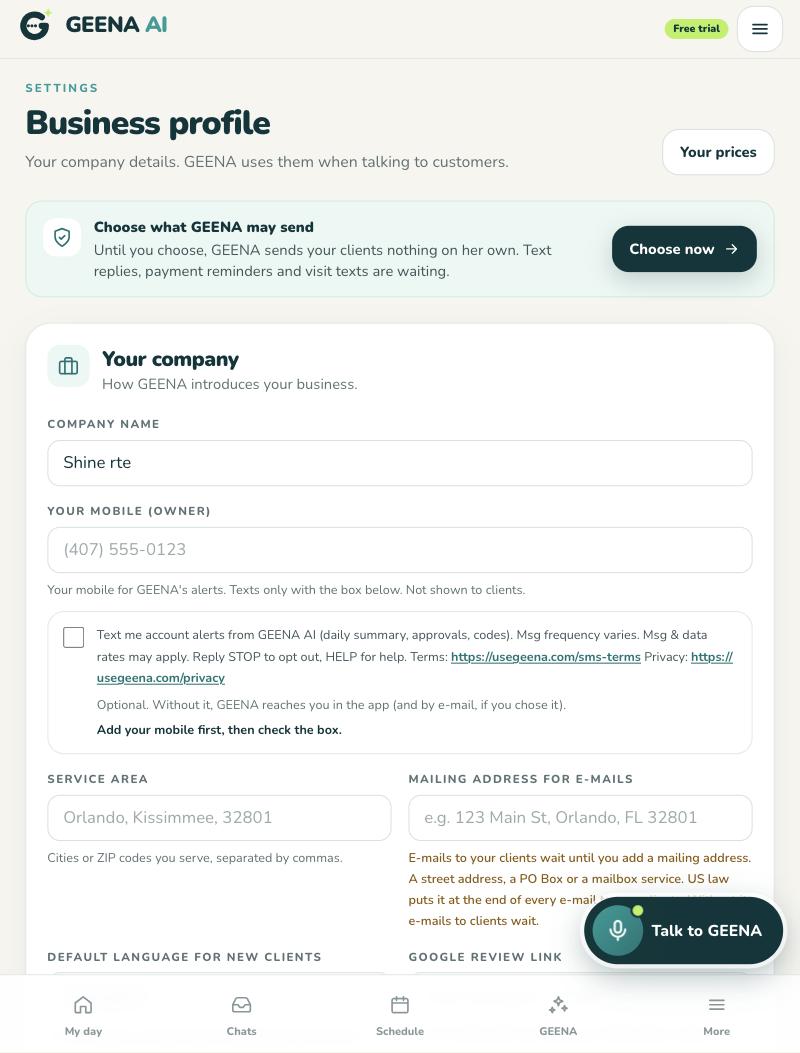
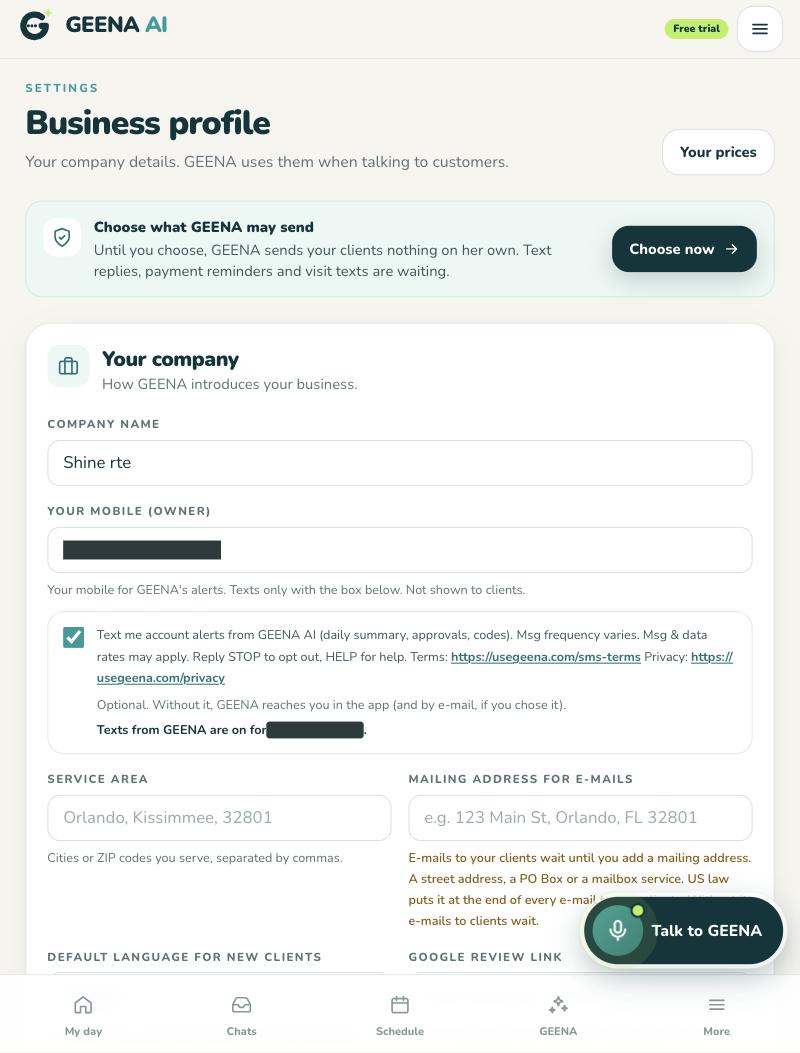
GEENA app (https://usegeena.com) › Settings › Business profile, under “Your mobile (owner)”. The same box also sits under “Your mobile number”, in the “Missed calls” section of that screen.
How
The owner types their own mobile number, checks the optional, unchecked box and saves. Only the owner can check this box: for a manager it is locked.

The exact words on the screen

Text me account alerts from GEENA AI (daily summary, approvals, codes). Msg frequency varies. Msg & data rates may apply. Reply STOP to opt out, HELP for help. Terms: https://usegeena.com/sms-terms Privacy: https://usegeena.com/privacy

Optional. Without it, GEENA reaches you in the app (and by e-mail, if you chose it).

What happens next

After the yes, the first text from GEENA AI is one confirmation:

GEENA AI: you're in for account alerts by text (daily summary, approvals, codes). Msg frequency varies. Msg & data rates may apply. Reply HELP for help, STOP to cancel.
Example of the screen inside the app (it is behind sign-in)

Screenshots of the real screen

GEENA app, Settings, Business profile: the “Your mobile (owner)” field and, under it, the unchecked SMS box with its full text and the Terms and Privacy links.
The box as the owner first sees it: unchecked.
The same Business profile screen after saving: the SMS box checked and the line “Texts from GEENA are on for” followed by a covered phone number.
After the owner checks the box and saves: “Texts from GEENA are on for …” (the number is covered).

The “Choose what GEENA may send” card at the top of both screenshots is about something else: texts to a business's own clients. Those are sent on the business's behalf, from the business's own number, under its own registration. They never come from GEENA AI's number and are not part of the texts on this page.

Path 2

Team members (GEENA Ajudante app)

Who
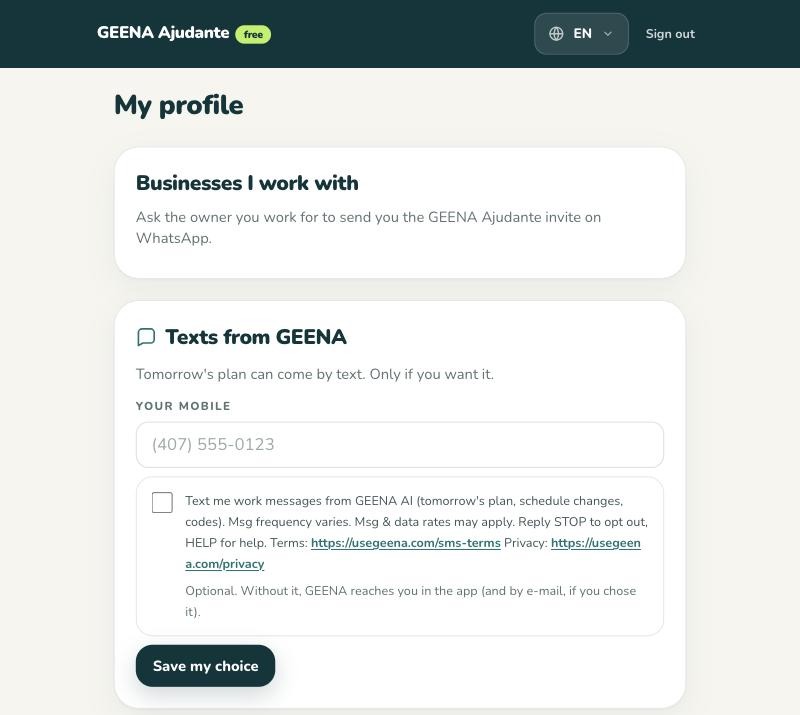
A cleaning team member who uses the free GEENA helper app (GEENA Ajudante), for their own mobile number.
Where
GEENA helper app (GEENA Ajudante) › My profile › “Texts from GEENA”. The app opens at https://usegeena.com/helper.
How
The team member types their own mobile number, checks the optional, unchecked box and taps “Save my choice”. The business owner cannot do it for them.

The exact words on the screen

Text me work messages from GEENA AI (tomorrow's plan, schedule changes, codes). Msg frequency varies. Msg & data rates may apply. Reply STOP to opt out, HELP for help. Terms: https://usegeena.com/sms-terms Privacy: https://usegeena.com/privacy

Optional. Without it, GEENA reaches you in the app (and by e-mail, if you chose it).

What happens next

After the yes, the first text from GEENA AI is one confirmation:

GEENA AI: you're in for work texts (tomorrow's plan, schedule changes, codes). Msg frequency varies. Msg & data rates may apply. Reply HELP for help, STOP to cancel.
Example of the screen inside the app (it is behind sign-in)

Screenshots of the real screen

GEENA helper app, My profile: the “Texts from GEENA” card with the mobile field, the unchecked SMS box with its full text and the Terms and Privacy links, and the “Save my choice” button.
The box as the team member first sees it: unchecked.

Path 3

Phone verification on the GEENA Network profile

Who
Owners and team members who choose to add a phone to their GEENA Network profile. Verifying the phone is optional.
Where
GEENA app › Network profile, or GEENA helper app (GEENA Ajudante) › My profile: the “Verified phone” card.
How
They type their own mobile number and tap “Text me a code” themselves. Each tap sends one text with a 6-digit code. It is not a yes to any other text.

The exact words on the screen

Tapping “Text me a code” sends you one text from GEENA AI with a verification code. Msg & data rates may apply. Reply STOP to opt out, HELP for help. SMS Terms · Privacy

What happens next

The text they get:

GEENA: 123456 is your GEENA verification code. Do not share it.
Example of the screen inside the app (it is behind sign-in)

Path 4

Texting START after a STOP

Who
Anyone who replied STOP to GEENA AI's number.
How
They text START or UNSTOP to +1 (848) 289-2652. Texts come back only for a number that sent STOP before: START never creates a yes the person did not give.

The reply:

GEENA AI: texts from GEENA are back on for this number. Msg frequency varies. Msg & data rates may apply. Reply HELP for help, STOP to opt out.

STOP and HELP

To stop: STOP, STOPALL, UNSUBSCRIBE, CANCEL, END, QUIT, REVOKE, OPTOUT, PARAR, ALTO, SAIR.

GEENA AI: you're unsubscribed and won't get more texts. Reply START to come back.

For help: HELP, INFO, AJUDA, AYUDA.

GEENA AI account alerts for cleaning business owners and teams. Help: contato@usegeena.com. Msg & data rates may apply. Reply STOP to opt out.

These are the English replies. PARAR, SAIR and AJUDA may get the same reply in Portuguese, and ALTO and AYUDA in Spanish.

SMS opt-in · GEENA AI